Can AI design CAD parts? Text-to-CAD vs code-CAD vs an agent driving real CAD

Short answer: Yes, for simple and well-specified mechanical parts, but how the AI works matters more than which chatbot you use. In 2026 there are three practical approaches:
- Prompt-to-model generators. You describe the part and a service returns a model.
- The AI writes code-CAD. An LLM writes a script for build123d, CadQuery or OpenSCAD, and you run it.
- An agent drives a real parametric CAD app through the Model Context Protocol (MCP), step by step, and can measure what it built.
They differ in whether you get an editable feature history, whether the AI can check its own work, and where your data goes.
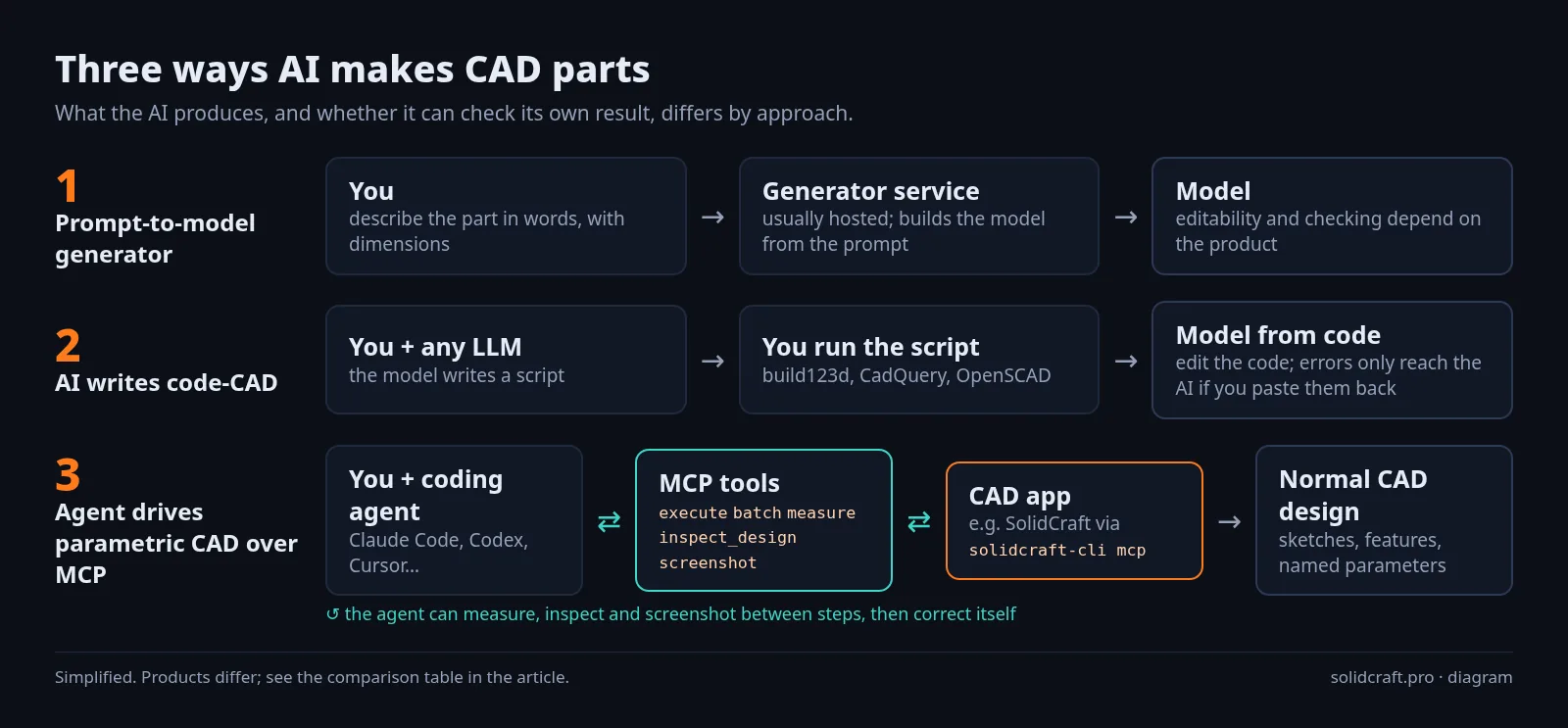
The three approaches at a glance
| Prompt-to-model generator | AI writes code-CAD | Agent drives parametric CAD (MCP) | |
|---|---|---|---|
| What you get | A model generated from your prompt | A script that produces the model | A normal CAD design: sketches, features and named parameters on a timeline |
| Editing afterwards | Depends on the product | Edit the code | Edit dimensions in the CAD app, or ask the agent |
| Can the AI check the result? | Depends on the product | Only if you run the script and feed results back | Yes. MCP tools can inspect, measure and screenshot between steps |
| Runs locally? | Usually a hosted service | Yes (the libraries are open source) | Depends on the CAD app; SolidCraft and FreeCAD run on your computer |
| Examples | Zoo's Zookeeper agent in Zoo Design Studio (successor to its Text-to-CAD) | build123d, CadQuery, OpenSCAD; agent toolkits such as text-to-cad | SolidCraft (built-in), FreeCAD MCP (community), Autodesk Fusion MCP (official, for Fusion subscribers) |
For the MCP servers side by side (setup, licences, what each can do), see CAD MCP servers compared.
1. Prompt-to-model generators
You type something like "manhole cover, 600 mm diameter, 50 mm thick, 200 mm hole in the middle" and get a part. Zoo's example prompts look like this. Its current product, Zookeeper, is described as a "conversational CAD agent" built into Zoo Design Studio. Zoo says it builds on its earlier Text-to-CAD work and can "inspect, snapshot, and debug geometry while generating". The same page links to a capabilities-and-limitations section and to pricing.
Good for: quick concepts and simple standard shapes. Watch for: vague prompts give vague parts. Zoo's own before/after prompt examples show that adding counts and dimensions in millimetres changes the result. Check what the service does with your prompts and files.
2. The AI writes code-CAD
Code-CAD libraries describe a part as a program. Any LLM can write that code, and you run it yourself:
- build123d and CadQuery are Python libraries on the OpenCASCADE kernel.
- OpenSCAD has its own scripting language.
- Toolkits such as text-to-cad package this for coding agents (Claude Code, Codex, Cursor and others) and export STEP, STL or 3MF. Note that its usage statistics are on by default.
Good for: parametric parts that are easy to express as code, version control, and repeatable variants. Watch for: the model can't see the result unless you run the script and paste the output or errors back. You also get code instead of a sketch-and-feature history that a CAD user would edit.
3. An agent drives a parametric CAD app over MCP
Here the AI acts like a CAD user. MCP gives an agent tools such as "run this modelling command", "set this parameter" and "measure this".
How it works in SolidCraft (v0.18.2):
solidcraft-cli mcpis a built-in MCP server. Headless, it runs its own design session. With--connectit drives the open desktop app, so you can watch the part being built. Every tool runs "the same [commands] the toolbar, palette, scripts and control channel use".- Read-only tools let the agent check its work:
inspect_design,measure,body_topologyanddescribe_command, which shows a command's parameter schema. Headless sessions can reject mistyped parameters with--param-check warn|strict. - By default the agent can reach files only inside the design's folder (within your home folder), the recovery folder, a private scratch folder, and folders you allow with
--allow-path. Dotfiles such as~/.sshare out of reach. - Setup for Claude Code is one line:
claude mcp add solidcraft -- solidcraft-cli mcp. Codex, Cursor and Claude Desktop are covered in our MCP tutorial. - There is also an in-app Agent chat (desktop only). It talks to a coding agent you already use, such as Claude Code, Codex, Google Antigravity, OpenCode or Grok Build, or to any OpenAI-compatible endpoint, including local Ollama or LM Studio. In the docs' words, "SolidCraft doesn't sell or proxy a model".
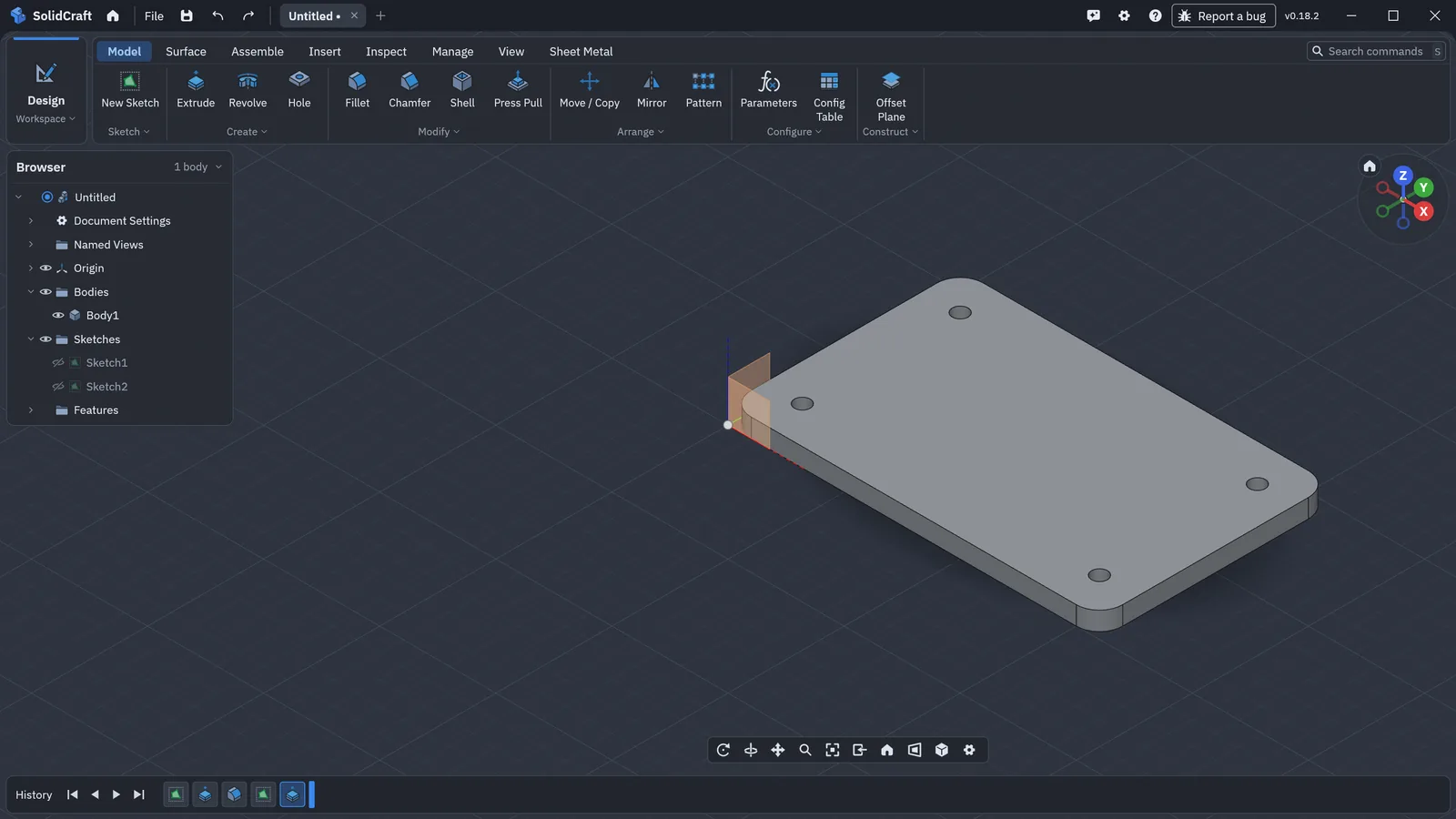
batch call through solidcraft-cli mcp --connect to the open SolidCraft v0.18.2 window. The measure tool then reported 15,768.9 mm³. Real screenshot, Windows, 21 Oct 2026.Good for: parts you want to keep editing as normal CAD, AI-assisted changes to an existing design, and checking dimensions as you go. Community builds include a scientific rover modelled entirely through MCP (examples). Watch for: the agent is only as capable as the CAD engine underneath. SolidCraft describes itself as "early but usable for simple parts", has no CAM, drawings or simulation yet, and is evaluating a new geometry kernel (why).
Which approach should you pick?
| If you want… | Try |
|---|---|
| A quick concept from one sentence, with no setup | A prompt-to-model service |
| Repeatable parts as code, in git | Code-CAD (build123d, CadQuery, OpenSCAD) plus any LLM |
| A real, editable parametric CAD file that the AI builds and measures, free and local | SolidCraft MCP |
| AI help inside a tool you already pay for | That vendor's AI or MCP option, for example Fusion MCP |
Tips that work with any of them
- Give numbers and units. "80 × 50 × 4 mm plate, R5 corners, four Ø3.4 mm holes 6 mm from the edges" works far better than "a small mounting plate".
- Ask for named parameters (width, wall thickness) so you can change the part later without the AI.
- Make the AI verify. With MCP, ask it to measure after each step. With code-CAD, run the script and paste the errors back.
- Export STEP for anything you'll keep or send to someone else, and STL or 3MF for printing (3D printing workflow).
- Review before you manufacture. AI-made geometry can look right and still be wrong.
Quick answers
Can ChatGPT make a CAD model? It can write code-CAD scripts that you run. To build parts inside a CAD app it needs an agent with MCP support. OpenAI's Codex is one, and our MCP tutorial shows the SolidCraft setup. We have not tested connecting the ChatGPT chat app itself to a local SolidCraft MCP server, so we don't claim it works.
Is there free, open-source AI CAD? Yes. Code-CAD libraries plus any LLM, or SolidCraft (MIT OR Apache-2.0) with its built-in MCP server and an agent you already use. The agent or model itself may cost money.
Can I keep everything local? With SolidCraft's Agent chat you can point it at a local model through Ollama or LM Studio. How good a local model is at CAD varies; we have not benchmarked it.
Sources (checked 2026-10-21)
- SolidCraft MCP documentation — https://docs.solidcraft.io/guide/mcp.html (and
docs/mcp.mdin https://github.com/tangency-labs/solidcraft) - SolidCraft Agent chat —
docs/agent-chat.mdin the same repository - SolidCraft README ("What works", licence) — https://github.com/tangency-labs/solidcraft
- Model Context Protocol — https://modelcontextprotocol.io
- Zoo Zookeeper / Text-to-CAD — https://zoo.dev/text-to-cad
- FreeCAD MCP (community) — https://github.com/neka-nat/freecad-mcp
- Autodesk Fusion MCP, text-to-cad, build123d, CadQuery, OpenSCAD — sources as listed in our CAD MCP servers comparison
More articles: SolidCraft blog · Not affiliated with SolidCraft or Tangency Labs (about this site).